Documentation

Build, test, and run MIRA.

Task-focused guides and implementation reference drawn directly from the repository.

Tutorial

Quickstart

Install MIRA, choose a bundled model, and open a local camera stream.

1. Install

PowerShell
git clone https://github.com/jeremy341/MIRA-AI.git
cd MIRA-AI
python -m venv .venv
.venv\Scripts\Activate.ps1
pip install -r requirements.txt

2. Check the environment

PowerShell
.\mira doctor
.\mira models

3. Start detection

PowerShell
.\mira live --model mira_exp019.pt
Reference

Configuration

mira.yaml is the shared configuration source for classes, paths, training defaults, inference thresholds, and export settings. CLI options override these values for one run.

mira.yaml
classes:
  names: [glass, metal, paper, plastic, trash]

training:
  default_model: yolo11n.pt
  default_epochs: 120
  default_batch_size: 32
  default_imgsz: 640

inference:
  reject_threshold: 0.55
  default_conf: 0.5
  default_iou: 0.45

Inspect the effective configuration with .\mira config.

Explanation

Architecture

The system separates camera capture, inference, presentation, and research tooling so each part can be tested independently.

Key modules

src/inference_engine.py

Model loading, frame skipping, latency history, and cleanup.

src/dashboard/backend/

FastAPI routes, camera orchestration, and WebSocket transport.

src/pipeline/

Dataset handling, strategies, validation, training, and benchmarking.

src/cli/

Plugin-registered commands for local and cloud workflows.

How-to

Run live inference

Launch the interactive model picker or specify a model directly.

PowerShell
.\mira live
.\mira live --model mira_exp019.pt
.\mira live --model mira_exp019.pt --camera 1 --resolution 1280x720
.\mira live --model mira_exp019.pt --conf 0.25 --reject 0.55

Confidence tiers

Below confidenceIgnored

Detections below --conf are not drawn.

UncertainVisible, not counted

Detections between confidence and reject thresholds are labelled unsicher.

ConfidentVisible and counted

Detections above the reject threshold contribute to inventory.

How-to

Use the dashboard

The dashboard runs locally. It does not upload camera frames to a public server.

PowerShell
.\mira dashboard
.\mira dashboard --port 8080
.\mira dashboard --host 0.0.0.0

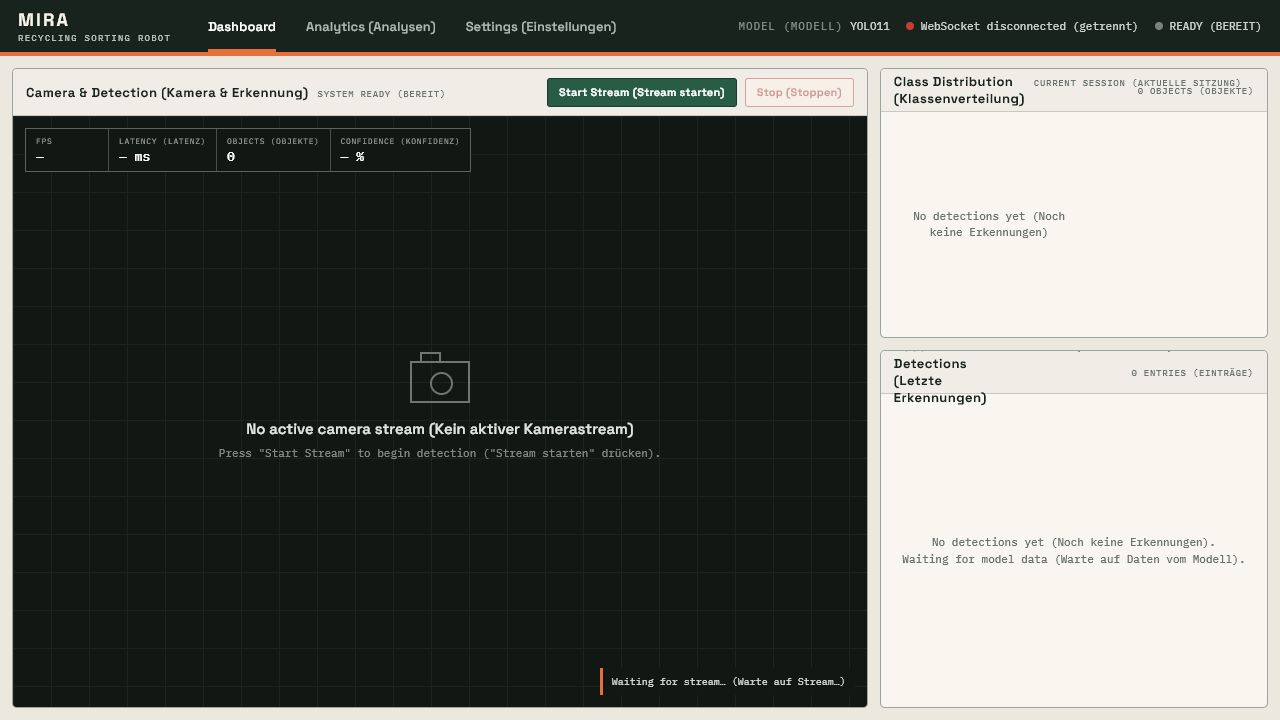
Open http://127.0.0.1:8000. Select a camera, load a model, and start the stream. The interface exposes class distribution, recent detections, FPS, latency, CPU, and memory history.

MIRA dashboard before a camera stream starts
The dashboard waits for a local model and camera stream.
How-to

Prepare datasets

Dataset files stay outside Git. Registry metadata and processing code keep their origins and transformations traceable.

PowerShell
.\mira datasets
.\mira merge --sources taco_trashnet roboflow --output datasets/mira_tnr
.\mira validate --dataset datasets/mira_tnr

Source families

  • TACO for litter in varied contexts.
  • TrashNet for material classification images.
  • Roboflow Trash Detection for YOLO-formatted waste objects.
  • Project-specific tabletop data for controlled detector training.
How-to

Train and evaluate

Experiment YAML files record model, dataset, image size, epochs, batch size, and augmentation. Result serialization adds timing and Git metadata.

PowerShell
.\mira train --config experiments/exp014_yolo11n_multidataset.yaml
.\mira eval-yolo --model models/detection/mira_exp019.pt
.\mira benchmark --models models/detection/mira_exp019.pt models/detection/mira_exp019_int8_640.tflite
.\mira generate kaggle --config experiments/exp014_yolo11n_multidataset.yaml

What gets measured

Detection quality

Precision, recall, mAP50, mAP50-95, IoU, and per-class metrics.

Runtime

Latency, throughput, model size, and platform information.

Provenance

Configuration, command arguments, Git SHA, and working-tree state.

Safety

Backups prevent result serialization from silently overwriting earlier files.

How-to

Export for edge

Export the PyTorch reference model, then benchmark the converted artifact before choosing it for deployment.

PowerShell
.\mira export --model models/detection/mira_exp019.pt --formats tflite_int8
.\mira diagnostics
Reference

Models

Recommended detector

mira_exp019.pt

mAP50
90.58%
Size
5.47 MB
Input
640 px
Edge candidate

mira_exp019_int8_640.tflite

mAP50
86.2% at 320 px export benchmark
Size
3.04 MB
I/O
FP32

Run .\mira models to list all discovered artifacts. Model metadata sidecars describe task, architecture, classes, and expected input shape.

Reference

CLI commands

Run

live
Start webcam inference.
dashboard
Launch the FastAPI dashboard.
download
Fetch published model artifacts.

Research

train
Run a configured training strategy.
eval-yolo
Evaluate a detector.
benchmark
Compare accuracy and latency.
export
Create TFLite or ONNX outputs.

Data

datasets
List registered sources.
merge
Build a unified YOLO dataset.
validate
Check structure and labels.

System

doctor
Run project health checks.
diagnostics
Inspect hardware support.
config
Display effective settings.
wizard
Guide training setup.
Reference

Dashboard API

The local FastAPI service exposes control and observation endpoints.

GET/api/status

System and stream state.

GET/api/models

Discovered model files.

POST/api/camera/initialize

Initialize camera input.

POST/api/model/load

Load a model.

POST/api/stream/start

Begin inference.

POST/api/stream/stop

Stop inference.

GET/api/statistics

Current class totals.

GET/api/metrics/history

Latency and system history.

GET/api/detections/recent

Recent detection records.

WS/ws/video

Encoded frames and overlays.

WS/ws/control

Configuration and state events.

Explanation

Known limitations

  • Crumpled white paper can be confused with plastic at high confidence.
  • End-on metal cans are underrepresented in training data.
  • Heavy overlap and occlusion reduce bounding-box quality.
  • The broad trash category remains difficult outside controlled tabletop validation.
  • Raspberry Pi and robotic sorting benchmarks are pending.
  • The dashboard has unit coverage but no tracked end-to-end camera and browser verification artifact.